
Table of Contents
How to Test Your PC Power Supply Without a Multimeter: Simple Methods That Work
Your PC won’t boot. The fans spin for a split second and stop. There is no POST, no display, no life. Before you blame the motherboard or CPU, check the most common point of failure first: the power supply unit (PSU). You do not need a multimeter or an electrical engineering degree to do it. This guide covers three safe, practical methods to test a PSU without any specialised equipment, explains what the results actually mean, and tells you when it is time to stop testing and buy a replacement. For more insights, How to Perform Online NAS Data Recovery on SSH-Enabled Devices Using Stellar.
Quick Answer: The Three Safest Methods
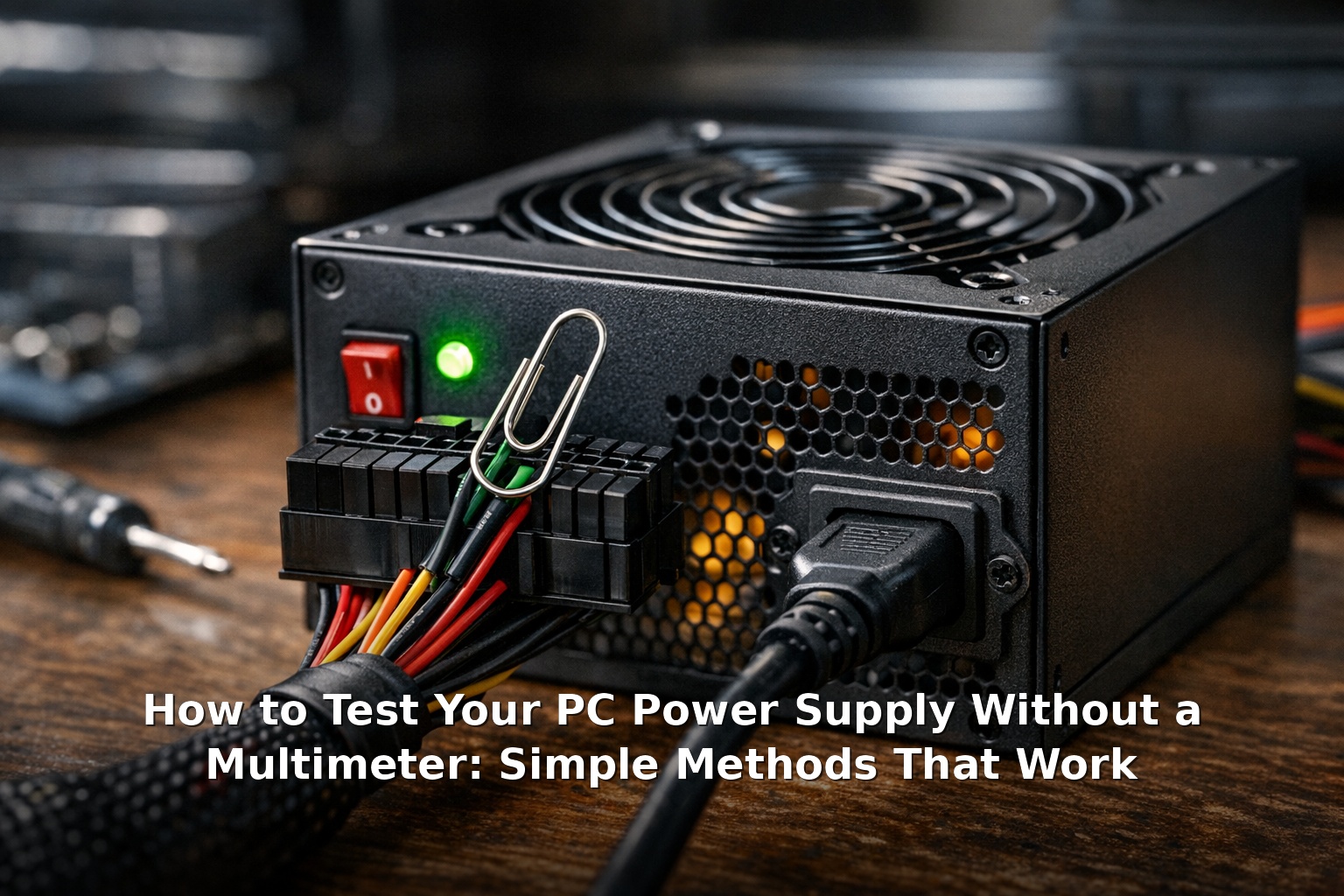
- The paperclip jumper test — Jump the power-on pin on the 24-pin motherboard connector. If the fan spins, the PSU’s basic power circuit works.
- Swap with a known-good PSU — Borrow a PSU from another PC. If the system boots, your original unit is faulty.
- Use a dedicated PSU tester — A cheap device (£8–£20) that plugs into the PSU and gives voltage readouts without a multimeter.
Why You Need to Test a PSU and When to Suspect It
A failing PSU often shows subtle symptoms that are easy to blame on other parts. You should suspect the power supply when you see: For more insights, How to Perform Online NAS Data Recovery on SSH-Enabled Devices Using Stellar.
- No power at all. Press the power button and nothing happens.
- Fans twitch and stop. The CPU or case fans spin for less than a second, then go dead.
- Random crashes under load. The PC shuts off during gaming, rendering, or benchmarks.
- Intermittent boot failures. The system works one day, refuses to start the next, then works again after being unplugged for a while.
- Unusual PSU noises. Clicking, buzzing, or whining from the back of the case.
- Component failures. Drives dropping off, RAM errors, or GPU instability persisting across different hardware.
Test the PSU first because it is the cheapest and easiest component to diagnose. A bad PSU can also damage other parts if you keep trying to use it. For more insights, Things To Avoid When Reselling Your Old Galaxy Phone.
Method 1: The Paperclip Jumper Test
This is the most widely known method for testing a PSU without any tools, and for good reason — it works. The paperclip test tells you whether the PSU receives power and whether its basic power-on circuitry functions. It does not tell you whether the voltages are stable, but it is an excellent first-pass check. For more insights, Things To Avoid When Reselling Your Old Galaxy Phone.
What You Need
- A paperclip, unfolded into a U-shape
- The PSU removed from the case (or at least unplugged from the motherboard)
- A case fan for load (optional, but useful with semi-passive PSUs)
Step-by-Step Instructions
- Unplug the PSU from mains power. Flip the switch to Off and disconnect the power cable. Never insert a jumper into a live connector.
- Remove the PSU from the case. Disconnect all cables from the motherboard, GPU, and drives. Place the PSU on a non-conductive surface.
- Locate the 24-pin motherboard connector. Identify the green wire (pin 16 on a standard ATX connector) and any black ground wire (pin 15, 17, or any adjacent black wire). On most connectors, pin 16 is the fourth pin from the clip on the top row.
- Prepare the jumper. Bend the unfolded paperclip so both ends can reach the two pins simultaneously.
- Insert the jumper. Put one end into the green wire hole and the other into an adjacent black ground hole. Ensure firm metal-to-metal contact.
- Plug in and flip the switch. Connect the power cable and flip the PSU switch to On.
- Check the fan. If the PSU fan spins and keeps spinning, the basic power circuit works. If the fan does not spin or only twitches, the PSU is likely faulty. Some PSUs have semi-passive fan modes — connect a case fan to add load if needed.
- Disconnect power and remove the jumper. Flip the switch to Off, unplug the cord, and remove the paperclip before reconnecting anything.
What the Paperclip Test Tells You
A spinning fan confirms the PSU receives mains power and its switching circuit works. This is a good sign but not a guarantee of clean, stable voltages. A PSU can power its own fan while delivering out-of-spec voltages on the 12V, 5V, or 3.3V rails. The test is pass/fail for basic functionality only. If the fan does not spin at all, the PSU is almost certainly dead. For more insights, Beyond the Buzz: What AI Really Does in Modern Software.
Method 2: Swapping With a Known-Good PSU
The paperclip test cannot tell you whether a PSU delivers stable power under load. The most definitive DIY test is swapping in a PSU you know works and seeing if the system boots. For more insights, Beyond the Buzz: What AI Really Does in Modern Software.
Where to Borrow a PSU
- Another desktop PC. Any standard ATX PSU works, as long as it has enough wattage (500W minimum for a basic test rig).
- A friend or local repair shop. Many shops will test your PSU for free or a small fee.
- A budget PSU bought for testing. Around £25–£40 buys a decent diagnostic unit you can keep for future use. Avoid the absolute cheapest no-name brands — a £15 PSU can be a fire hazard.
How to Perform the Swap Test
- Disconnect the suspect PSU and remove it from the case.
- Install the known-good PSU. Connect the 24-pin motherboard power, CPU power (4-pin or 8-pin), and GPU power as needed.
- Connect at least one fan for a visual indicator.
- Attempt to boot using the front power button.
- If the system posts, your original PSU is almost certainly faulty.
- If it still fails with a known-good PSU, the problem is elsewhere — motherboard, CPU, or a short in the case wiring.
Cable Compatibility Warning
Never mix modular PSU cables between different brands or models. The PSU-side connector is not standardised. Using a Corsair cable on an EVGA PSU can route 12V to a 3.3V pin and destroy the connected component instantly. Always use the cables that came with the PSU you are testing.
Method 3: Using a PSU Tester
A PSU tester costs £8–£20 from Amazon or eBay. It plugs into the 24-pin ATX connector and displays voltage readings for each rail on an LCD screen. Most testers also check the Power Good (PG) signal.
Advantages
- Gives numerical voltage readings (12V, 5V, 3.3V rails) — more information than the paperclip test.
- Checks the PG signal, which a missing or delayed PG can cause boot failures even with nominally correct voltages.
- Dead simple to use — plug in, power on, read the numbers.
Limitations
- No dynamic load. A tester applies only a light load. A PSU that passes at idle can fail under real-world GPU and CPU draw.
- No ripple measurement. Excessive AC ripple can cause instability but requires an oscilloscope to measure.
- False confidence. A passing result on a cheap tester does not guarantee health under load. If the system still crashes, proceed to the swap test.
When to Buy One
A PSU tester is worth buying if you maintain multiple PCs for family, friends, or a small business. For testing a single PSU for your own machine, the paperclip test followed by a swap test is more thorough and costs nothing.
What These Tests Tell You — and What They Do Not
It is important to understand the limits of any PSU test without a multimeter under load. If the PSU fails any test, replace it immediately. If it passes all tests but your system is still unstable, the problem may be a subtle PSU issue only manifesting under load, or another component entirely. The swap test is the only reliable way to be certain without specialised equipment.
Danger Signs: Stop Testing and Replace
Some PSU failures are not subtle. If you encounter any of the following, do not plug the PSU back into your system:
- Burning smell (ozone or burnt plastic)
- Visible damage — bulging capacitors, burnt PCB, melted plastic
- Popped breaker — the PSU trips your circuit breaker every time
- Smoke — unplug immediately
- Loud crackling or arcing sounds — serious fire hazard
Do not attempt to open a PSU. Internal capacitors can hold a lethal charge for months. There are no user-serviceable parts in a standard ATX PSU. Dispose of it at an electronics recycling centre.
When to Replace vs. Repair, and Budget Replacement Costs
PSU repair is never worth it for consumer units. Replacement capacitors plus labour cost more than a new PSU, and repaired units lack safety certifications. The only exception is a premium unit costing hundreds of pounds, and even then only a qualified technician should do the work. For everyone else: replace, do not repair.
Budget Replacement Recommendations (UK Prices)
- Entry-level (300W–450W): £30–£45 for office PCs without a dedicated GPU. Look at Corsair CV450, EVGA 400 N1, or Cooler Master MWE 450 Bronze.
- Mid-range (500W–650W): £50–£80 for mid-range gaming with one GPU. Look at Corsair CX550M, EVGA 600 BQ, Seasonic S12III-550, or be quiet! System Power 10 550W.
- Performance (750W–850W): £85–£120 for high-end gaming or workstations. Look at Corsair RM750e, MSI MPG A850G, or Seasonic Focus GX-750.
Check the PSU Cultists tier list (cultists.network) before buying. Stick to tier A or B for a system you care about, tier C for a budget build.
Related Posts:



Frequently Asked Questions
Can a bad PSU damage other components?
Yes. A failing PSU can send overvoltage spikes to the motherboard, CPU, GPU, and drives, causing permanent damage. Out-of-spec voltages can also corrupt data on SSDs and HDDs. Never keep using a PSU you suspect is faulty. For more on data protection, see our guide on performing online NAS data recovery on SSH-enabled devices using Stellar.
How long do PSUs last?
A quality PSU lasts 7–10 years under normal use. Budget units often fail within 2–4 years, especially in hot environments or under sustained high load. Capacitors degrade even when not in use, so a 10-year-old PSU in storage is not reliable for a new build. If you are reselling an old device, check the PSU age before including it.
Modular vs. non-modular — does it affect reliability?
No. Reliability depends on the OEM, capacitor quality, and protection circuitry — not whether the cables are detachable. Modular just means better cable management. For more on modern hardware technology, see our article on what AI really does in modern software.
What voltage readings are acceptable?
ATX spec allows ±5% of nominal values under load: 12V rail: 11.40V–12.60V, 5V rail: 4.75V–5.25V, 3.3V rail: 3.14V–3.47V. If a PSU tester shows readings outside these ranges, replace the unit. Readings near the edge (e.g., 11.5V on the 12V rail) are a yellow flag — the unit may fail under sustained load.
Can I test a PSU without removing it from the case?
Yes — just unplug the 24-pin connector from the motherboard and jumper it in place. However, removing the PSU lets you inspect for bulging capacitors, dust, and burnt components. If testing in the case, make sure nothing metal touches the exposed pins. For further reading, latest information on How to Test Your PC Power Supply Without a Multime.
My PSU fan spins but the PC still won’t boot. What now?
Proceed to the swap test (Method 2) with a known-good PSU. If the PC still fails, the issue is likely the motherboard, CPU, or RAM. For a broader perspective on future technology trends, read our piece on future-proofing and the rise of reproductive rights tech.
Final Thoughts
Testing a PC power supply without a multimeter is straightforward. Start with the paperclip jumper test to confirm basic function. If that passes but the system still does not boot, move to the PSU swap test — the gold standard for DIY diagnosis. A cheap PSU tester can give you voltage readings, but never forget that idle voltages are not the same as load performance. When in doubt, replace. A quality PSU is the most important component for long-term PC reliability, and a decent 80 PLUS Bronze unit costs less than a takeaway. Do not risk your motherboard, GPU, and data on a PSU you are not sure about. For further reading, latest information on How to Test Your PC Power Supply Without a Multime.
References: iFixit PSU testing guides, Intel PSU buying guide, Corsair PSU support documentation.